Automatic Lead Follow-Ups on WhatsApp
October 22, 2026
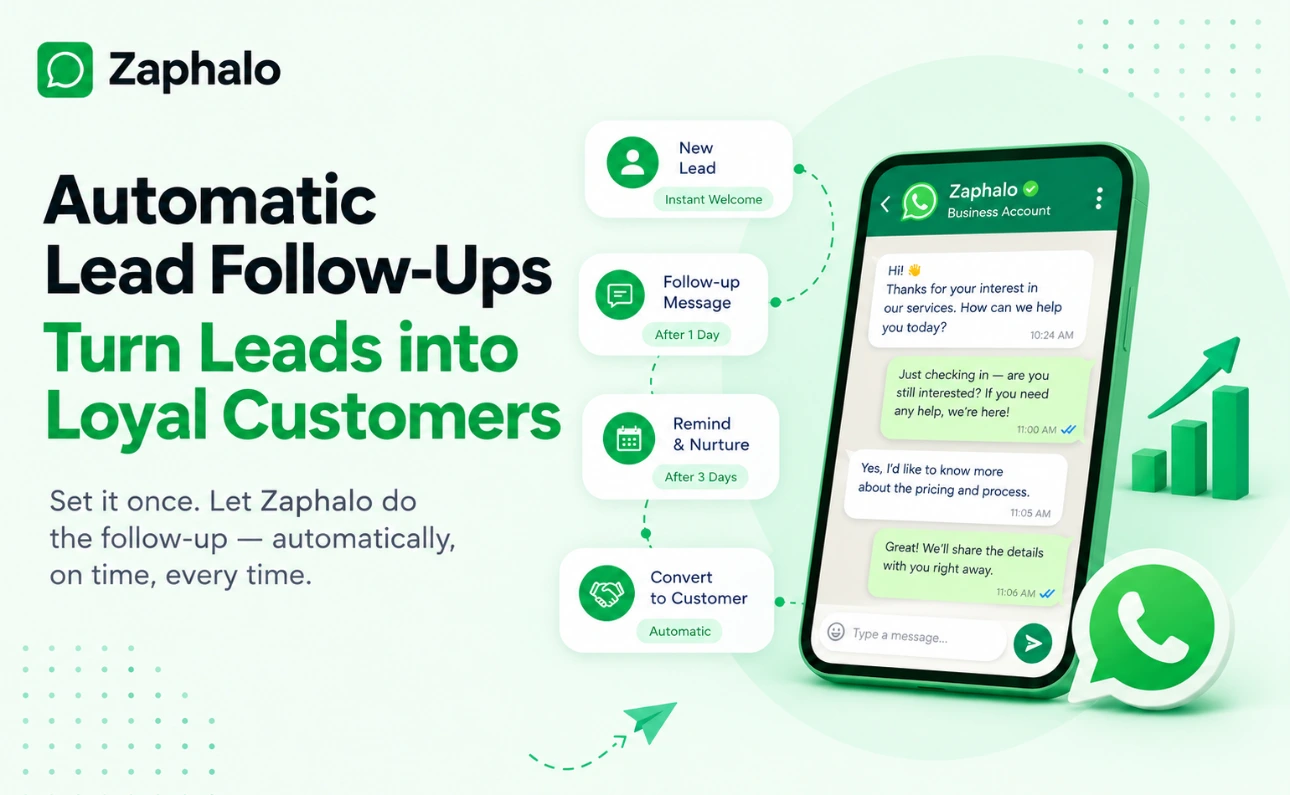
Most businesses do not lose leads because their product is bad. They lose them because the follow-up never happened.
A customer sends an enquiry. Your team replies, the customer says "I will think about it", and the conversation goes quiet. A day later there are new enquiries to handle. A week later nobody remembers who was waiting for a second message. The lead is not rejected. It is simply forgotten.
Automatic lead follow-up solves this problem. Instead of relying on someone to remember, you decide in advance what should be sent, when it should be sent, and when it should stop. WhatsApp is an especially good channel for this in India because customers already read and reply to messages there every day.
This guide explains what automatic lead follow-up is, how a follow-up sequence works, how to set one up with Zaphalo, and how to keep your messages useful instead of annoying.
Key Takeaways
- Automatic lead follow-up sends a planned WhatsApp message after a specific event, without anyone having to remember.
- A good follow-up rule answers four questions: who receives it, what is sent, when it is sent, and when it stops.
- A short sequence of useful messages works better than repeating the same reminder.
- Always send to contacts who have agreed to hear from you, and always set an end date.
- Follow-ups sent outside WhatsApp’s 24-hour customer service window must use approved message templates. However, when a lead initiates a conversation through Meta Ads, the 24-hour customer service window opens, allowing you to send free-form messages during that period.
What Is Automatic Lead Follow-Up?
Automatic lead follow-up means sending a planned message to a lead at a set time after a specific event, for example after your broadcast message is delivered, without a team member doing it by hand.
The follow-up is not random. It is connected to something that already happened: a message was delivered, an enquiry was received, or a customer showed interest and then stopped replying. The system uses that event as the starting point and sends the next message when you told it to.
It is different from a simple scheduled broadcast. A broadcast goes to a list at one time. A follow-up depends on what happened with the previous message, so it reaches people at a more relevant moment.
Why Manual Follow-Ups Fail
Many small teams start by following up manually, using a notebook, a spreadsheet, or memory. This works with a handful of leads. It breaks down quickly as enquiries increase.
Leads Get Forgotten
When a team is busy, the newest conversation always gets attention first. Older leads quietly slip away.
Timing Becomes Inconsistent
One lead gets a follow-up after one day, another after two weeks, and a third never hears back. The result depends on who was free, not on what the customer needs.
Messages Are Written Again and Again
Typing the same reminder repeatedly wastes time that could be spent talking to customers who are ready to buy.
Nobody Knows What Was Sent
When several people handle leads, it is difficult to know who already received a follow-up and who did not.
A defined follow-up process fixes all four problems. Every lead gets the same planned experience, on time, with no extra effort from the team.
How Automatic Follow-Ups Work in Zaphalo
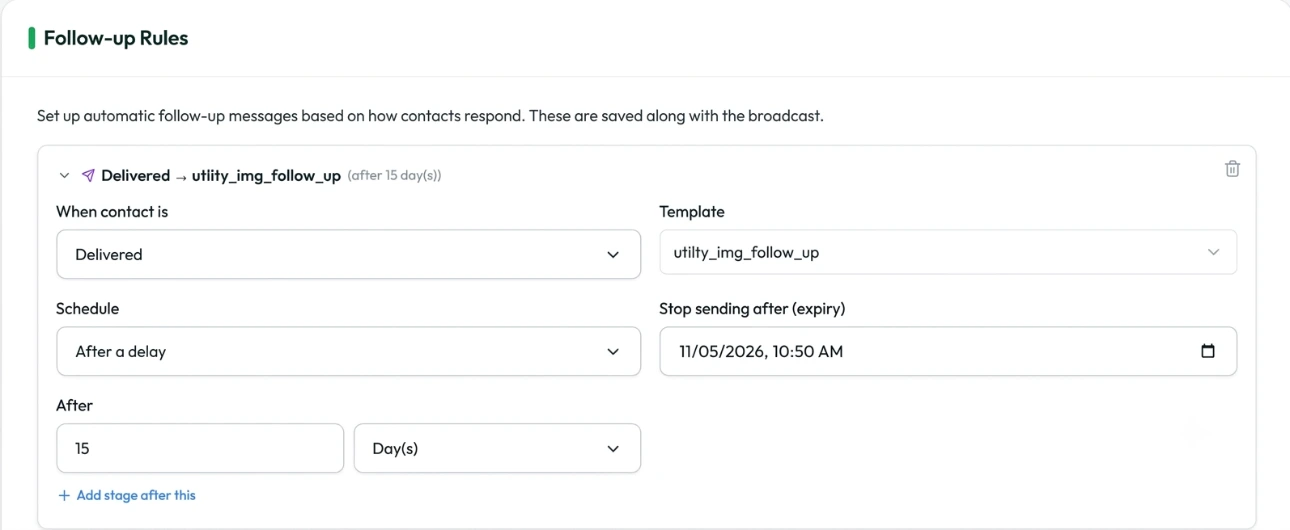
In Zaphalo, follow-ups are built into the broadcast screen. When you open a broadcast, you will find a section called Follow-up Rules. It lets you set up automatic follow-up messages based on how contacts respond, and the rules are saved together with the broadcast. You do not need a separate tool or a separate list.
Each follow-up rule has a small number of fields. Here is what each one does, using the example in the screenshot below.
When Contact Is
This is the trigger. It is the status a contact must reach for the rule to apply. In the example, the rule starts when the broadcast message has been Delivered to the contact.
Template
This is the message that will be sent. Because follow-ups usually go out after the 24-hour customer service window has closed, they are sent as approved WhatsApp templates. The example uses a follow-up template named utility_img_follow_up.
Schedule and After
Here you decide the timing. The example uses After a delay, and the delay is set to 15 days. You can change both the number and the unit to suit your sales cycle.
Stop Sending After (Expiry)
This is the safety limit. After the date and time you set, the follow-up is no longer sent. It protects customers from receiving messages long after they are relevant, and protects your account from looking like spam.
Together, these fields turn a vague intention such as "we should follow up with these people" into a clear instruction the system can carry out.
Build a Multi-Stage Follow-Up Sequence
One follow-up is useful. A short sequence is better, because different leads need a different number of nudges.
Zaphalo lets you click Add stage after this to attach another follow-up to the one you just created. Each stage becomes the next step in the chain, with its own template, timing, and expiry date. If you want a completely separate branch, use Add top-level rule.
Once saved, every stage is shown as a single line, such as "Delivered, follow-up template, after 15 days, expires on a given date", so you can read the whole sequence at a glance and open any stage to edit it.

The screenshot shows four chained stages, each waiting 15 days and each with a later expiry date. This is a test setup that reuses one template. In a real campaign you would use a different message at each stage, so the lead sees something new every time instead of the same reminder.
How to Set Up an Automatic Follow-Up in Zaphalo
The process takes only a few minutes once your template is ready.
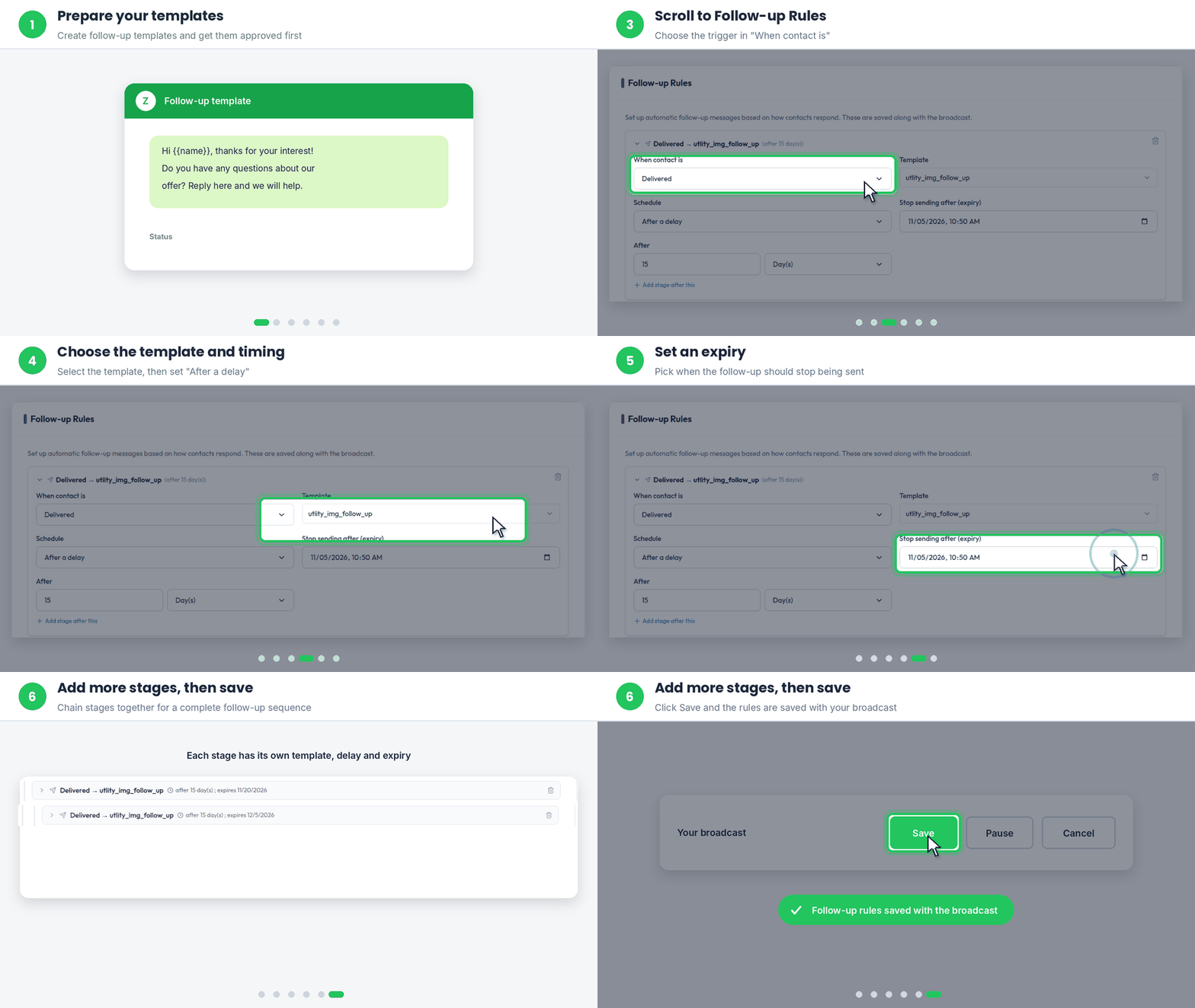
Step 1: Prepare Your Templates
Create and get approval for the WhatsApp templates you want to use as follow-ups. Write each one for a specific stage of the conversation.
Step 2: Open or Create a Broadcast
Choose your contacts, your first message, and your schedule date as usual.
Step 3: Scroll to Follow-up Rules
Add a rule and choose the status that should trigger it in the When contact is field.
Step 4: Choose the Template and Timing
Select the follow-up template, set After a delay, and enter how long the system should wait.
Step 5: Set an Expiry
Pick the date and time after which the follow-up should stop being sent.
Step 6: Add More Stages if Needed
Use Add stage after this to build the next step, then Save the broadcast. Your follow-up rules are saved with it.
Example Follow-Up Sequences You Can Adapt
The right timing depends on how long your customers take to decide. Use these as starting points, then adjust them after you see how your leads respond.
| Type of Business | First Follow-Up | Second Follow-Up | Final Follow-Up |
|---|---|---|---|
| Online store | After 1 day: a helpful reminder about the product they viewed | After 3 days: answers to common questions | After 7 days: a limited-time offer |
| Coaching or education | After 2 days: details about the course and the next batch | After 5 days: a student result or testimonial | After 10 days: last date to register |
| Local service or clinic | After 1 day: an invitation to book a slot | After 4 days: what to expect at the visit | After 14 days: a gentle check-in |
| B2B or high-value sale | After 3 days: a short summary and next step | After 7 days: a case study | After 15 days: a final check on interest |
Notice that every message gives the customer something new: information, proof, or a clear deadline. That is what separates a useful follow-up from a nag.
Best Practices for WhatsApp Follow-Ups That Get Replies
1. Send Only to Contacts Who Opted In
Customers should have agreed to receive messages from your business. This protects your reputation and follows WhatsApp's business messaging rules.
2. Give Every Message One Clear Purpose
Ask for one action: reply, book, visit, or confirm. Messages with several requests are harder to answer.
3. Keep It Short and Natural
A follow-up should read like a helpful message from a person, not a brochure. Use the language your customers actually use, whether that is English, Hindi, Gujarati, or a mix.
4. Add Something New at Each Stage
Share a fact, an answer, an example, or a deadline. Repeating "just checking in" three times makes customers stop reading.
5. Space Messages Sensibly
Leave enough time between stages for the customer to act. The right gap is shorter for low-cost purchases and longer for considered decisions.
6. Always Set an Expiry
A follow-up that never ends becomes irrelevant. A clear end date keeps your communication respectful and your account healthy.
7. Review the Results
Look at which stage gets the most replies and which gets the most opt-outs. Then improve the weaker messages and adjust the timing.
Common Follow-Up Mistakes to Avoid
- Sending the same message at every stage. Each step should give the lead a new reason to respond.
- Following up too often. Too many messages in a short time lead to blocks and reports.
- Waiting too long. If the first follow-up arrives weeks later, the customer may have forgotten you.
- Ignoring replies. Automation starts the conversation, but a real person should handle questions and negotiation.
- Skipping the expiry date. Without an end point, messages can reach people long after they are useful.
- Messaging people who never agreed to hear from you. Consent is the foundation of good WhatsApp marketing.
Why Use Zaphalo for Automatic Lead Follow-Ups
You can follow up manually, but it does not scale. With Zaphalo, the follow-up sequence lives inside the same broadcast you already create, so there is no extra tool to learn.
- Set follow-up rules directly on the broadcast screen.
- Choose the trigger, the template, the delay, and the expiry for every stage.
- Chain several stages into one sequence, or create separate top-level rules.
- Review every stage in a simple list and edit it whenever you need to.
- Keep broadcasts, contacts, templates, and follow-ups together in one WhatsApp marketing platform.
The result is that no interested lead depends on someone's memory. Your team spends its time on conversations that matter, while the routine reminders take care of themselves.
Conclusion
Following up is one of the simplest ways to get more value from the leads you already have. The challenge is not knowing that you should do it. It is doing it consistently when the team is busy. Automatic lead follow-up on WhatsApp turns that good intention into a reliable process.
Choose the trigger, write useful templates, set sensible timing, add an expiry date, and let the system handle the routine messages while your team focuses on real conversations.
Start with one simple sequence, measure the replies, and improve it. With Zaphalo, you can set it up in the same place where you create your broadcasts.
Never Lose Another Interested Lead
Set up automatic WhatsApp follow-ups with Zaphalo and stay in touch with every lead at the right time.
14-day free trial • Cancel anytime